


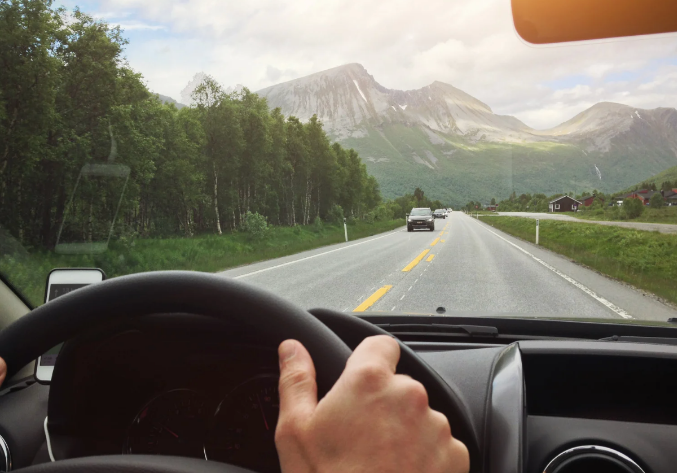
Getting around Houston as a visitor usually means choosing between a rental car and a rideshare service. Because Houston’s attractions are spread across a large metropolitan area, most visitors spend a significant amount of time on major highways and arterial roads where crash rates are higher than on local streets.
That exposure changes depending on how you travel. A rental car places you in control of the vehicle, while a rideshare trip introduces additional legal and insurance questions if a crash occurs. Coverage may depend on whether the driver was waiting for a ride request, driving to a passenger, or actively transporting one.
Rideshare collisions have become a specialized area of motor vehicle law because they introduce legal questions that do not exist in most car accident cases, including app status, layered insurance coverage, and corporate liability. Firms that regularly handle these claims develop experience interpreting those issues. Sutliff & Stout’s Houston Uber accident lawyers represent people injured in rideshare crashes, applying board-certified trial experience and extensive settlement history to claims that require analysis beyond a standard auto insurance dispute.
Here is what to watch for with each option.
Renting a Car: The Unfamiliar Vehicle Problem
A rental car is not just an unfamiliar city, it is also an unfamiliar machine.
Differences in blind spot size, mirror placement, braking response, and even where the turn signal stalk sits can slow a driver’s reaction time in the exact moments that matter most.
Before you leave the rental lot:
- Adjust every mirror and seat position before pulling out, not after you’re already in traffic.
- Locate the hazard lights, wipers, and headlight controls while parked, since fumbling for these mid-drive on an unfamiliar dashboard is a common distraction risk.
- Note the vehicle’s blind spots specifically. Larger SUVs and trucks, common in rental fleets, often have significantly larger blind spots than the car you drive at home.
- If possible, do a short test loop in the rental lot or a quiet nearby street before merging onto a highway.
Once you’re driving:
- Build in extra following distance for the first day of driving, since braking response on an unfamiliar vehicle takes longer to calibrate.
- Avoid Houston’s busiest highway interchanges during your first outing if you have flexibility in timing. The I-610/I-69 interchange and ongoing I-45 expansion zones involve frequent lane shifts that catch even experienced local drivers off guard.
- Know before you drive that Houston uses feeder roads extensively, meaning highway traffic exits directly into local streets at speed. This is a road design many visitors, particularly international travelers, have never encountered.
Local Traffic Rules Visitors Often Miss
Houston, like the rest of Texas, has a few traffic rules that surprise out-of-state and international visitors specifically.
- Right turns on red are legal unless a sign says otherwise, which means traffic behind you will expect you to turn if the way is clear, even if your instinct from home says to wait for green.
- Speed limits shift quickly between highway, feeder road, and local street, sometimes within a few hundred feet, and Houston’s actual traffic speeds frequently run 10 to 15 miles per hour above the posted limit on major corridors.
- School zones are strictly enforced with cameras in many areas, and the reduced speed zones are not always intuitive to visitors unfamiliar with local school schedules.
- Texas is a right-of-way state at four-way stops based on order of arrival, not size of vehicle or perceived urgency, which can create confusion at unmarked intersections common in older Houston neighborhoods.
Rideshare feels safer than driving unfamiliar streets, and in many respects, it is, but it carries its own specific risk profile that tourists should understand before assuming it removes all danger.
Driver workload is the core issue. Rideshare drivers are classified as independent contractors, which means there are no federally mandated limits on how long they can drive continuously, unlike commercial truck drivers who operate under strict hours-of-service rules. Research has found that drivers taking 10 or more trips a day, driving on unfamiliar roads, or working while fatigued show meaningfully higher accident rates. A significant share of rideshare drivers work a separate full-time job and drive during off-hours, which stacks fatigue risk directly into the busiest tourist pickup windows, particularly late at night.
Distraction is built into the job. Unlike an average driver who might glance at a phone occasionally, a rideshare driver is required to interact with an app constantly: accepting new requests, following turn-by-turn navigation, and communicating with riders, all while driving. This is a structural distraction risk that exists on every single trip, not just an occasional lapse.
Tourist destinations carry elevated risk specifically. Areas with high visitor traffic see more accidents involving rideshare vehicles in part because drivers are frequently navigating unfamiliar pickup and drop-off points themselves, compounding the same unfamiliar-road risk a tourist faces in a rental car, just from the driver’s seat instead.
- Verify the license plate, driver name, and car model against the app before getting in, every single time, even if the car matches what you expect.
- Sit in the back seat, which gives you two working exits and puts distance between you and a distracted or fatigued driver.
- Use the in-app trip-sharing feature so a family member or travel companion can see your live location and route.
- If a driver’s route deviates significantly from what the app shows with no explanation, say something immediately rather than assuming it is fine.
- Avoid rideshare pickup during the highest-risk windows, generally late Friday and Saturday nights, when both driver fatigue and the number of impaired drivers on the surrounding roads peak.
- If you feel unsafe for any reason, most rideshare apps have an in-app emergency button that can alert local authorities with your trip details.
Neither renting a car nor using rideshare removes the risk of a crash in Houston. A rental car makes you responsible for an unfamiliar road network. A rideshare shifts that responsibility to another driver, but it also introduces different insurance and liability issues.
If an Uber or Lyft crash results in an injury, one of the first questions is not who called the ride. It is which insurance policy applies. The driver’s status in the app, fault for the collision, available coverage, and the severity of the injuries all affect how much an Uber accident claim may be worth. Those issues do not arise in the same way in most standard car accident claims.















I didn’t realize how tricky the blind spots were on the rental SUV until I nearly missed a lane change on the feeder road out of downtown.